
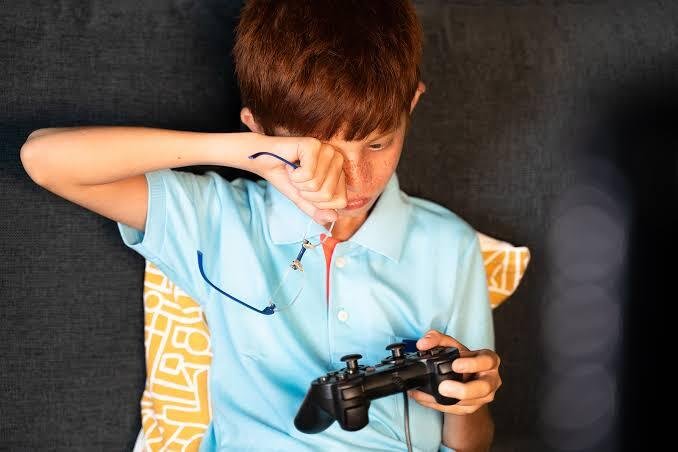
Gaming and general screen time have become such a normal part of daily life that the toll they take on the eyes rarely gets a second thought, blending into work, entertainment, and everyday communication until it’s simply background noise most people stop noticing. Here is a look at what’s actually happening beneath that surface, and what genuinely helps once the pattern becomes clear.
Why Gaming and Screen Time Add Up More Than People Realise
The Sheer Volume of Daily Screen Exposure
Gaming, work screens, and general browsing all add to one continuous total across a typical day, even though each activity feels separate and manageable on its own when considered individually rather than as part of a larger pattern. This figure tends to surprise people once they actually count it, often revealing a far higher total than expected once every hour of gaming, work, and casual scrolling gets tallied together honestly rather than estimated loosely.
Most people picture their screen time in terms of one obvious block, an evening gaming session, say, without factoring in the phone checks, work screens, and background browsing that fill the rest of the day around it.
Why Gaming Specifically Demands More From the Eyes
Fast-paced, high-focus gameplay demands a different level of attention compared to more passive screen activities like watching a show or browsing casually through a feed. This level of sustained attention causes more strain than casual browsing, since a game rarely allows the eyes the same natural breaks a more relaxed screen activity might offer between scenes or moments of lower intensity.
A competitive match or a demanding boss fight asks for continuous, locked-in focus in a way that few other everyday screen activities genuinely require, which is part of why gaming sessions tend to leave the eyes feeling more fatigued than an equivalent stretch of passive viewing.
Common Habits Contributing to Eye Strain
Long, Uninterrupted Gaming Sessions
Hours of play with no natural pause built in give the eyes little chance to recover throughout a session, particularly during a game that offers no obvious stopping point. This lets strain build up unchecked over a session, often reaching a noticeable level only once the game finally ends and the adrenaline of play starts to fade, leaving the accumulated discomfort suddenly obvious.
A session that feels perfectly fine hour after hour can leave a surprising amount of strain behind once the screen goes dark and there’s nothing left to distract from it.
Poor Lighting Setups
Gaming in a dark room with only the screen as a light source creates a sharp contrast that adds extra strain on top of what the game itself already demands from a purely visual standpoint. This common setup adds unnecessary strain, since the eyes have to work harder adjusting between the brightness of the screen and the surrounding darkness, especially during longer sessions where this contrast never really lets up.
Many gamers prefer a darkened room for the sake of immersion, without realising that this same setup is quietly adding to the strain building up over the course of play.
Sitting Too Close to the Screen
A closer viewing distance than most other screen activities increases the effort the eyes have to put in to stay focused on fast-moving details throughout a session. This increases the effort the eyes have to put in, particularly for players who sit close for a wider field of view or faster reaction times, a trade-off that rarely gets weighed against the discomfort it eventually causes.
The Signs Most People Ignore
The Obvious Symptoms
Headaches, blurred vision, and tired eyes after a long session get brushed off as just part of gaming for hours rather than something worth addressing directly or mentioning to anyone. These get brushed off as just part of gaming for hours, since the discomfort tends to fade on its own and rarely feels urgent enough to investigate further, even when the same pattern repeats session after session.
The Subtler Signs
Dry, gritty eyes from reduced blinking during intense play often go unnoticed until they become a regular occurrence rather than an occasional annoyance that quickly fades. Difficulty focusing on distant objects right after a session is another subtle sign that tends to pass without much thought, since it usually resolves within a few minutes and rarely leaves much of a lasting impression.
What Actually Helps
The 20-20-20 Rule
Looking at something 20 feet away for 20 seconds every 20 minutes gives the eyes a genuine break from close, fixed focus, allowing the eye muscles to relax briefly before returning to close-up work. Consistency matters more than doing it perfectly every time, since the habit works best as a regular pattern built into a gaming session rather than an occasional effort remembered only once discomfort has already set in.
Fixing the Lighting Setup
Adding ambient light rather than playing in total darkness reduces the contrast between screen brightness and room lighting that otherwise forces the eyes to work harder throughout a session. This simple change reduces strain without affecting the experience, rarely disrupting immersion as much as most gamers initially assume it might once they actually try it.
Building in Proper Breaks
Short breaks away from all screens, not just switching between them, give the eyes a genuine chance to rest rather than simply shifting focus elsewhere without any real relief. This distinction matters more than people think, since a phone check during a gaming break still involves the same close, fixed focus that caused the strain in the first place, offering no real rest at all.
Adjusting Your Screen and Display Settings
Brightness and Blue Light Settings
Matching screen brightness to the room, rather than leaving it at default, reduces the effort the eyes need to put in throughout a session without any change to the actual game or content being played. Blue light filters can help, particularly for evening sessions, easing the harsher end of the light spectrum that tends to feel more taxing on the eyes late in the day when they’re already tired from everything else.
Refresh Rate and Resolution Considerations
A smoother, well-calibrated display can ease strain during fast-paced games, since a choppy or poorly configured image forces the eyes to work harder to track movement clearly across the screen. Balancing performance settings with genuine visual comfort tends to produce a setup that feels good to look at as well as perform well competitively, rather than sacrificing one for the other.
Choosing Gaming Gear With Eye Comfort in Mind
Monitor Size and Distance
A bigger screen doesn’t always mean more strain if distance is adjusted properly, since the relationship between screen size and comfortable viewing distance matters more than size alone when setting up a display. Finding a comfortable setup that suits the games actually being played, rather than simply maximising screen size for its own sake, tends to produce a more genuinely comfortable long-term setup for regular use.
Anti-Glare Screens and Filters
Simple additions like anti-glare screens or filters cut down on reflected light during play, removing a source of strain that has nothing to do with the game itself but adds up over a long session regardless. This matters more for rooms with windows or overhead lighting, where reflections on the screen can otherwise force the eyes to work harder throughout a session without the player necessarily realising why.
Getting the Right Vision Correction
Comfortable Options for Long Screen Sessions
Try to shop for contact lenses or glasses suited for close-up, extended screen use that make a real difference for anyone who games regularly for long periods across the week rather than the occasional short session. Comfort matters just as much as clarity for regular gamers, since a technically clear prescription that still leaves eyes feeling tired isn’t doing its job properly during a long session regardless of how sharp the vision itself measures on paper.
Why an Outdated Prescription Makes Things Worse
The eyes work harder to compensate for a correction that no longer fits current needs, adding extra effort on top of the strain gaming already causes during a demanding session. A quick check can make a noticeable difference to daily comfort, particularly for anyone whose gaming sessions regularly stretch well beyond an hour or two without much of a break in between.
Matching Correction to Gaming Habits Specifically
Different Games, Different Visual Demands
Competitive, fast-paced games place different demands on the eyes than slower, more casual sessions, given how much sustained close focus and quick reaction time the former typically requires compared to a more relaxed title. A one-size prescription approach doesn’t always account for this, since a correction that suits casual browsing might not hold up as well during hours of intense, fast-paced play where every second of visual attention matters.
Talking to an Optician About Actual Gaming Habits
Mentioning session length and game type during an eye test gives an optician a much clearer picture of what to check for and what advice might actually help someone in that specific situation. This leads to more tailored, useful advice than a generic check-up, since an optician working with a full picture of gaming habits can offer guidance more specific to an individual’s actual routine rather than a set of generic questions alone.
Contacts vs. Glasses During Gameplay
When Frames Get in the Way
Glasses can interfere with headsets, VR gear, or fast head movement during play, adding a physical obstacle to sessions that already demand quick, unrestricted motion from the player. Some gamers switch to contact lenses specifically for longer or more physical sessions, removing this friction entirely for the type of play that benefits most from it, particularly anything involving a headset or rapid, repeated movement.
Keeping a Backup Option on Hand
A spare pair of glasses or lenses for when the primary option isn’t comfortable provides a simple safety net for an unexpected issue mid-session that could otherwise cut things short. Having a backup avoids a session cut short over an easily solved problem, whether that’s a lost or damaged lens or a pair of glasses that simply become uncomfortable that day for no obvious reason.
Building Eye Care Into a Regular Gaming Routine
Making Vision Checks Part of the Routine
Treating an eye test as a normal part of maintaining a gaming setup, not an afterthought, keeps vision correction in step with actual daily demands rather than falling behind them gradually over time. This small habit prevents bigger issues down the line, catching a gradual change in prescription before it becomes a noticeable source of discomfort that’s harder to trace back to its actual cause.
Reassessing as Habits Change
Revisiting vision correction choices if gaming habits shift, such as longer sessions or new genres with different visual demands, keeps correction relevant to actual current use rather than a routine set once and never reconsidered. What worked a year ago might not suit a changed routine today, particularly for anyone whose gaming has shifted toward longer sessions or more visually demanding titles than what they were originally playing.
When to See an Optician
Signs Worth a Proper Check
Persistent discomfort that doesn’t improve with simple adjustments is worth a proper check rather than continued guesswork with setup and habits alone, especially once several fixes have already been tried without much improvement. Vision changes that seem to line up with increased screen time are also worth mentioning at an appointment, since they can point to a prescription that needs updating rather than simply reflecting normal fatigue.
The Value of a Regular Check
Catching a change in prescription before it causes ongoing strain matters more for regular gamers and heavy screen users, given how much close-up focus a typical gaming session now involves compared to a more casual, occasional player. A routine check, done consistently rather than only once something feels wrong, tends to catch small changes before they become a bigger source of discomfort that’s already been building quietly for some time.
The Bottom Line
Gaming and screen time aren’t going anywhere, and for most players, cutting back significantly simply isn’t the point of a hobby built around genuine enjoyment and connection with other players. What actually makes the difference isn’t giving up gaming, but a handful of small, consistent adjustments applied regularly rather than only once discomfort has already built up considerably by the end of a long session. A short break every twenty minutes, a properly lit setup, the right screen settings, and vision correction that genuinely suits how much time actually gets spent gaming all work together far more effectively than any single change attempted on its own.
None of this asks anyone to game less or give up the setups, genres, or long sessions that make the hobby genuinely enjoyable in the first place. It asks for a bit more awareness of how these small, repeated moments of screen use add up across a week of regular play, and a willingness to build in the kind of habits that keep strain from accumulating unchecked session after session. A regular eye test remains one of the most reliable ways to stay ahead of any changes, catching a shift in prescription or a developing pattern of discomfort before it starts affecting focus and reaction time during exactly the moments that matter most in a game. Protecting your eyes across years of regular gaming comes down to consistency far more than any single fix, and the earlier these habits become part of a normal routine, the less catching up there is to do once the cumulative effects of unaddressed strain eventually start to show.
