
Creating a resume is one of the most important steps in any job search. Your resume is often the first impression an employer has of you, and in many cases, it determines whether you move forward to an interview or get overlooked.
But when it comes to building a resume, many job seekers face one common question: Should I use a resume template or a resume builder?
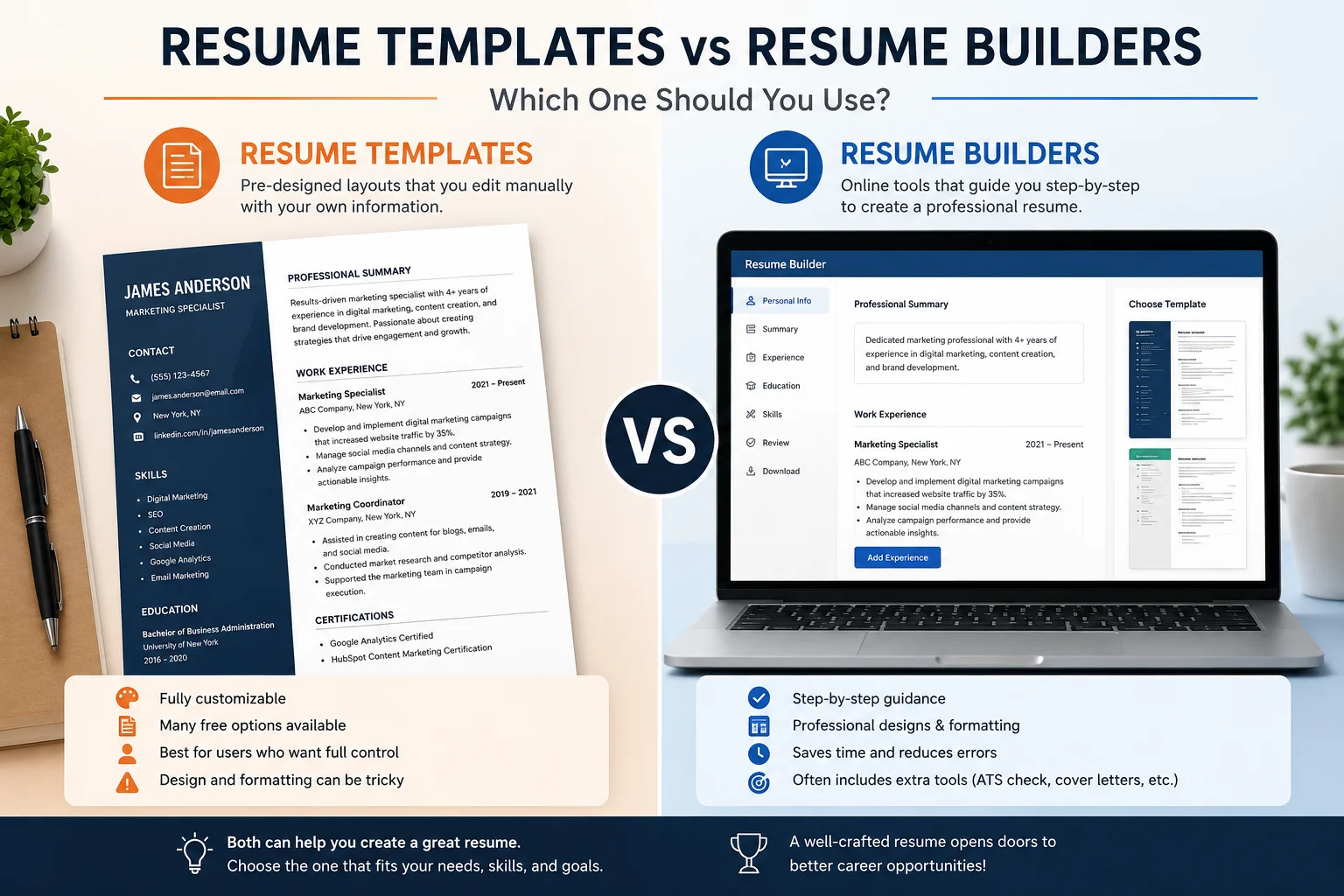
Both options can help you create a professional resume, but they work in different ways. A resume template gives you a ready-made layout that you can edit manually, while a resume builder guides you step by step and often helps with structure, formatting, wording, and optimization.
The best choice depends on your experience, confidence, time, industry, and how much help you need creating a strong resume. In this guide, we will compare resume templates vs resume builders in detail so you can choose the best option for your career goals.
What Is a Resume Template?
A resume template is a pre-designed resume layout that you can customize with your own information. It usually includes sections such as contact details, professional summary, work experience, education, skills, and certifications.
Resume templates are available in different formats, including:
- Microsoft Word templates
- Google Docs templates
- PDF templates
- Canva templates
- HTML resume templates
- Online downloadable templates
A resume template gives you a structure to follow. Instead of starting from a blank page, you simply replace the sample content with your own details.
For example, a template may already include headings like:
- Professional Summary
- Work Experience
- Education
- Skills
- Certifications
Your job is to fill in the details and adjust the layout where necessary.
What Is a Resume Builder?
A resume builder is an online tool that helps you create a resume through a guided process. Instead of editing a document manually, you enter your information into form fields, choose a design, and the system generates a professional resume for you.
A resume builder usually helps with:
- Resume structure
- Section organization
- Formatting
- Design
- Content suggestions
- Job-specific wording
- Downloadable resume formats
- ATS-friendly layouts
Some resume builders also include extra tools such as cover letter builders, resume websites, AI writing assistants, and interview preparation features.
For example, MyCVCreator allows job seekers to create professional resumes, cover letters, and career documents using guided tools that make the process easier and more organized.
Resume Templates vs Resume Builders: The Main Difference
The biggest difference between a resume template and a resume builder is the level of guidance.
A resume template gives you a design and structure, but you are responsible for editing, writing, formatting, and organizing everything yourself.
A resume builder guides you through the process, helping you build your resume section by section.
Think of it this way:
- A resume template is like a blank form with a nice design.
- A resume builder is like a guided assistant that helps you complete the form properly.
Both can be useful, but they serve different types of job seekers.
Benefits of Using Resume Templates
Resume templates are popular because they are simple, flexible, and easy to access. Many job seekers prefer them because they can download a template and edit it directly.
1. Resume Templates Save Time
Starting from a blank document can feel overwhelming. A resume template gives you a ready-made structure, helping you create a resume faster.
You do not have to decide where each section should go or how the document should look. The template already gives you a layout.
2. They Are Easy to Customize
If you are comfortable using Word, Google Docs, or design tools, a resume template gives you freedom to adjust the design, spacing, font, and sections.
You can add or remove sections based on your needs.
For example, you may add:
- Projects
- Awards
- Volunteer work
- Languages
- Publications
- Professional memberships
This flexibility is helpful for people who already know how they want their resume to look.
3. Templates Are Good for Simple Resumes
If you need a basic resume quickly, a template can be a good option. It helps you create a clean document without using a complex system.
This can work well for:
- Students
- Entry-level applicants
- Part-time job seekers
- Freelancers
- People applying for local jobs
4. Templates Give You Design Control
Some job seekers prefer complete control over their resume design. A template allows you to make manual edits and adjust details exactly how you want.
This is especially useful if you work in a creative field and want a more personalized layout.
Limitations of Resume Templates
Resume templates can be helpful, but they also have weaknesses. A good-looking resume is not always a strong resume.
1. Templates Do Not Write the Resume for You
A template gives you space to write, but it does not tell you what to write. If your content is weak, the resume will still be weak even if the design looks professional.
For example, a template may include a section for work experience, but it will not automatically turn this:
Responsible for customer service
Into this:
Resolved customer inquiries through phone and email support, improving response time and customer satisfaction.
You still need to know how to write strong resume bullet points.
2. Some Templates Are Not ATS-Friendly
Many modern resume templates use graphics, icons, columns, text boxes, and unusual designs. These may look attractive, but they can cause problems with Applicant Tracking Systems.
ATS software scans resumes for keywords, sections, and relevant information. If the layout is too complex, the system may not read your resume correctly.
This is a major risk when applying online.
3. Formatting Can Break Easily
If you edit a resume template manually, the formatting can shift. A small change can affect spacing, alignment, page breaks, or section order.
This can be frustrating, especially if you are not comfortable with document editing.
4. Templates Offer Limited Guidance
A template does not usually tell you whether your resume is too long, missing important sections, or poorly organized.
You may end up with a resume that looks fine but does not perform well.
Benefits of Using Resume Builders
Resume builders are designed to make resume creation easier, especially for people who want guidance, speed, and professional structure.
1. Resume Builders Guide You Step by Step
A resume builder walks you through each section of your resume. Instead of wondering what to include, you fill in guided fields such as:
- Name and contact details
- Professional summary
- Work history
- Education
- Skills
- Certifications
- Achievements
This makes the process easier and less stressful.
2. They Help With Resume Structure
A strong resume needs the right structure. Resume builders usually organize your information in a logical order so employers can quickly understand your background.
Most professional resumes follow this structure:
- Contact information
- Professional summary
- Skills
- Work experience
- Education
- Certifications or additional sections
A resume builder helps ensure these sections are presented clearly.
3. Resume Builders Can Improve Formatting
Formatting is one of the most common resume problems. A resume builder handles spacing, alignment, fonts, and layout automatically.
This helps prevent common issues like:
- Uneven spacing
- Misaligned sections
- Broken bullet points
- Poor page breaks
- Inconsistent font sizes
- Overcrowded design
The result is usually cleaner and more professional.
4. They Are Faster for Many Job Seekers
If you need a resume quickly, a resume builder can save time because it removes much of the manual work.
You do not have to design the page from scratch or fix formatting problems. You simply enter your information and choose your preferred design.
5. Some Resume Builders Offer Content Suggestions
Advanced resume builders may suggest professional phrases, skills, and bullet points based on your role or industry.
This can be very useful if you struggle with wording.
For example, instead of writing:
Helped with reports
A resume builder may help you create a stronger version:
Prepared weekly reports using spreadsheet tools to support team planning and decision-making.
This makes your resume sound more professional and results-focused.
6. Resume Builders Can Support ATS-Friendly Resumes
Many resume builders offer clean, ATS-friendly resume formats. This is important because many employers use applicant tracking systems to filter resumes before a recruiter reviews them.
A good resume builder helps you avoid design elements that may confuse ATS software.
Limitations of Resume Builders
Resume builders are powerful, but they are not perfect for everyone.
1. Some Builders Offer Limited Customization
Some resume builders restrict how much you can change the layout. If you want full design control, a template may feel more flexible.
However, this limitation can also be helpful because it prevents users from damaging the structure or making the resume too complicated.
2. Not All Resume Builders Are Equal
Some resume builders are simple and only provide basic formatting. Others offer more advanced features such as AI assistance, cover letter creation, ATS checking, and job-specific suggestions.
Before using a resume builder, check whether it provides the features you need.
3. You Still Need Good Content
A resume builder can guide you, but you still need to provide accurate and meaningful information.
The tool can help with structure and wording, but it cannot replace your real experience, achievements, and career story.
Which Option Is Better for ATS Screening?
For online job applications, ATS compatibility is very important.
A resume builder may be better for ATS screening if it provides clean layouts, standard headings, and keyword-friendly sections. Many job seekers make the mistake of using highly designed templates that look impressive but fail ATS scanning.
An ATS-friendly resume should include:
- Simple formatting
- Standard section headings
- Clear job titles
- Relevant keywords
- Clean bullet points
- No unnecessary graphics
- Easy-to-read structure
Resume templates can also be ATS-friendly, but only if they are designed properly. A simple Word or Google Docs template can work well, while a heavily designed visual template may create problems.
The best choice for ATS depends less on whether it is a template or builder and more on whether the final resume is readable, structured, and relevant.
Which Option Is Better for Beginners?
For beginners, a resume builder is usually easier.
If you are creating your first resume, you may not know:
- What sections to include
- How long the resume should be
- How to describe experience
- What skills to list
- How to format the document
- How to avoid common mistakes
A resume builder gives you guidance and reduces confusion.
Students, fresh graduates, and first-time job seekers may benefit from using a builder because it helps them organize limited experience into a professional format.
Which Option Is Better for Experienced Professionals?
Experienced professionals can benefit from either option.
A resume template may work if you already know how to write strong resume content and only need a professional layout.
A resume builder may be better if you want to:
- Save time
- Organize long work history
- Create multiple resume versions
- Improve formatting
- Build a cover letter too
- Prepare for job applications faster
For professionals applying to competitive roles, a resume builder with ATS-friendly features can be especially useful.
Which Option Is Better for Career Changers?
Career changers often need more guidance, so a resume builder may be the better choice.
When changing careers, your resume must show transferable skills. You need to connect past experience to the new role clearly.
For example, if you are moving from hospitality to customer support, your resume should highlight:
- Communication
- Problem-solving
- Customer service
- Conflict resolution
- Time management
- Teamwork
A resume builder can help organize these skills and present them in a way that makes sense to employers.
Which Option Is Better for Creative Professionals?
Creative professionals may prefer resume templates because they allow more design flexibility.
For roles in design, media, branding, or content creation, a visually appealing resume can be useful. However, creative professionals should still keep an ATS-friendly version for online applications.
A smart approach is to have two resumes:
- A creative resume for networking, portfolios, or direct sharing
- An ATS-friendly resume for online job applications
This gives you both visual impact and digital compatibility.
Resume Templates vs Resume Builders: Cost Comparison
Resume templates are often free or low-cost. You may find templates in Word, Google Docs, Canva, or career websites.
Resume builders may offer free features, paid downloads, premium templates, or advanced tools.
The better value depends on what you need.
A free template may be enough if you can write and format your resume confidently. A resume builder may be worth it if it saves time, improves quality, and helps you create a more professional application.
The cheapest option is not always the best option. A weak resume can cost you job opportunities.
Resume Templates vs Resume Builders: Time Comparison
Resume templates can be quick if you already know what to write. But they can also take longer if you spend time fixing formatting or rewriting content.
Resume builders are usually faster because they guide you through the process.
A resume builder may be better if you:
- Need a resume quickly
- Are not confident with formatting
- Want a guided process
- Need multiple versions
- Want downloadable formats
A template may be faster if you already have strong resume content ready and only need a layout.
Common Mistakes When Using Resume Templates
If you choose a resume template, avoid these mistakes:
Choosing style over readability
A beautiful resume is not useful if recruiters cannot read it quickly.
Using too many design elements
Icons, graphics, and decorative lines can make the resume harder for ATS systems to scan.
Keeping sample content
Many job seekers forget to fully replace placeholder text. Always proofread carefully.
Making the resume too crowded
Trying to fit too much on one page can make the document difficult to read.
Ignoring keywords
A template does not automatically make your resume relevant to the job. You still need to tailor your content.
Common Mistakes When Using Resume Builders
If you choose a resume builder, avoid these mistakes:
Relying too much on default wording
Suggested phrases can help, but your resume should still sound personal and specific.
Not tailoring the resume
Do not use the same resume for every application. Customize it for each job.
Adding too many sections
Only include sections that strengthen your application.
Ignoring proofreading
Even if the builder formats your resume well, you still need to check spelling, grammar, names, dates, and contact details.
Choosing the wrong template inside the builder
Use clean, professional designs for most job applications.
How to Choose Between a Resume Template and a Resume Builder
To decide which option is right for you, ask yourself these questions:
Do I know what to write?
If yes, a resume template may be enough.
If no, a resume builder may help more.
Am I comfortable with formatting?
If yes, a template can work well.
If no, a builder is safer.
Am I applying online?
If yes, choose an ATS-friendly resume format.
Do I need the resume quickly?
A resume builder may save time.
Do I want more control over design?
A resume template may give you more flexibility.
Do I need help with wording?
A resume builder with content suggestions may be better.
Am I creating multiple job applications?
A resume builder may make it easier to create and manage different versions.
When to Use a Resume Template
A resume template may be the best choice if:
- You already have strong resume content
- You are comfortable editing documents
- You want full control over layout
- You only need a simple resume
- You are applying for a role that does not require heavy customization
- You want a downloadable document you can manually adjust
Templates are useful for people who know what they are doing and only need a professional design to save time.
When to Use a Resume Builder
A resume builder may be the best choice if:
- You are not sure how to structure your resume
- You need help writing resume sections
- You want a faster process
- You want clean formatting
- You need an ATS-friendly resume
- You are applying to several jobs
- You want to create a cover letter too
- You prefer a guided experience
A resume builder is especially useful for job seekers who want both speed and support.
Can You Use Both?
Yes. In fact, using both can be a smart approach.
You can start with a resume builder to create a strong structure, then use a resume template to create a different version if needed.
For example:
- Use a resume builder for your main ATS-friendly resume
- Use a creative template for networking or portfolio sharing
- Use a simple template for quick edits
- Use a builder to generate different versions for different job roles
The best resume strategy is not always about choosing one option forever. It is about using the right tool for the right situation.
Resume Templates vs Resume Builders: Quick Comparison
| Feature | Resume Templates | Resume Builders |
| Ease of use | Moderate | Easy |
| Guidance | Limited | Strong |
| Formatting support | Manual | Automatic |
| Design control | High | Moderate |
| ATS support | Depends on template | Often better |
| Speed | Fast if content is ready | Usually faster |
| Writing help | Limited | Often included |
| Best for | Confident users | Beginners and busy job seekers |
| Customization | High | Depends on tool |
| Risk of formatting errors | Higher | Lower |
Why MyCVCreator Is Useful for Resume Creation
MyCVCreator helps job seekers create professional resumes, CVs, cover letters, and career documents more easily. Instead of struggling with a blank page or spending hours fixing formatting, users can follow a structured process and build resumes that look clean and professional.
A platform like MyCVCreator can be helpful because it supports:
- Professional resume creation
- CV building
- Cover letter writing
- Resume templates
- Job application preparation
- Interview preparation
- Career-focused tools
For job seekers who want a faster and more organized way to create application documents, using a resume builder can be a practical advantage.
Final Verdict: Resume Templates or Resume Builders?
Resume templates and resume builders are both useful, but they are not the same.
A resume template is best if you want a ready-made design and you are confident writing and formatting your own resume.
A resume builder is best if you want guidance, speed, clean formatting, and help organizing your information professionally.
For most job seekers, especially those applying online, a resume builder is often the better choice because it reduces mistakes and makes the process easier. However, a well-designed resume template can also work if it is simple, ATS-friendly, and properly customized.
The most important thing is not the tool itself. The most important thing is the final resume. It should be clear, professional, targeted to the job, easy to read, and strong enough to help you get interviews.
Whether you use a resume template, a resume builder, or both, focus on creating a resume that presents your skills, achievements, and experience in the best possible way. A good resume does more than list your background. It tells employers why you are the right person for the job.
